# Designing your resume
> Use the builder's Design tab to set the template, page layout, fonts, colors, page settings and the language of your resume's headings.
The **Design** tab of the Edit panel controls how your resume looks. Your content stays the same whatever you change here, and the preview updates as you go.
## What's in the Design tab
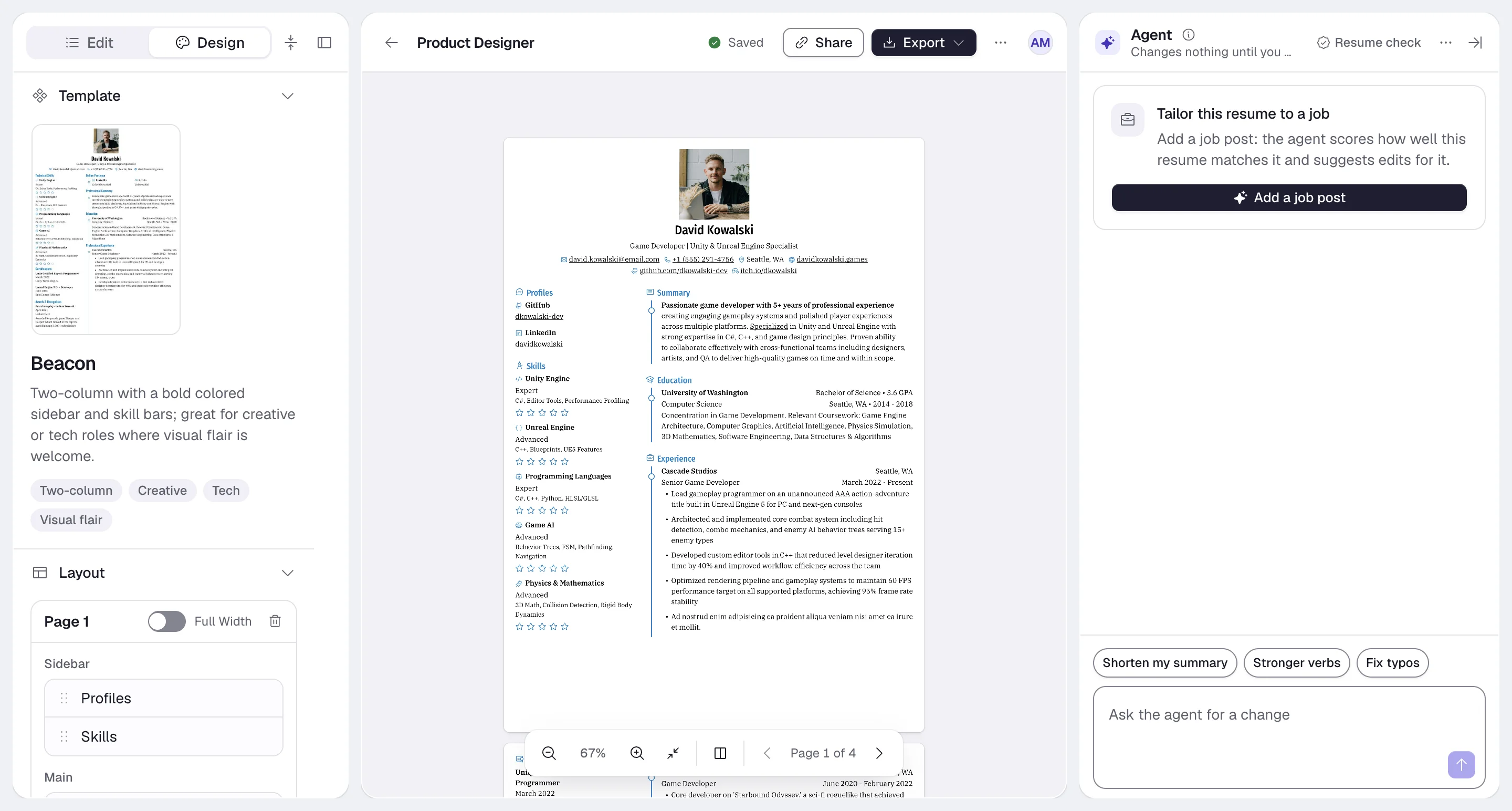
The groups appear in this order. Use **Collapse all groups** / **Expand all groups** at the top of the panel to fold them.
| Group | What it controls | More detail |
| --- | --- | --- |
| **Template** | The overall design. | [Choosing a template](https://docs.hiresweep.com/guides/choosing-a-template) |
| **Layout** | Pages, columns, full-width pages and sidebar width. | [Layout](#layout) below |
| **Typography** | Fonts, weights, sizes and line height. | [Typography](#typography) below |
| **Design** | Colors and the style of skill and language levels. | [Colors and levels](#colors-and-levels) below |
| **Custom Styles** | Rules that restyle one section or one part of every section. | [Using custom styles](https://docs.hiresweep.com/guides/using-custom-styles) |
| **Page** | Resume language, paper format, margins, spacing and icons. | [Page](#page) below |
| **Notes** | Private notes that never print. | [Using private notes](https://docs.hiresweep.com/guides/using-private-notes) |
| **Sharing** | The public link and its password. | [Sharing your resume publicly](https://docs.hiresweep.com/guides/sharing-your-resume-publicly) |
| **Statistics** | Views and downloads of the public page. | [Sharing your resume publicly](https://docs.hiresweep.com/guides/sharing-your-resume-publicly#statistics) |
## Layout
Layout decides which sections go on which page, and in which column.
Each page is a card, **Page 1**, **Page 2** and so on, with a **Main** column and, next to it, a **Sidebar** column. Drag a section by its handle to move it within a column, to the other column, or to another page. The order in each column is the order on the resume.
| Control | What it does |
| --- | --- |
| **Add Page** | Adds an empty page at the end. |
| **Full Width** | Makes the page one column. Sections in its sidebar move to the main column. |
| **Delete Page** | Deletes the page and moves its sections to another page. The confirmation message has an **Undo** button. You can't delete the only page. |
| **Sidebar Width** | Sets the sidebar's share of the page width, from 10% to 50%. |
Where the sidebar sits, left or right, depends on the template. Single-flow templates such as Ridge print the sidebar column's sections after the main column.
To put a cover letter on its own page, add a page and drag the cover letter section onto it. See [Adding a cover
letter](https://docs.hiresweep.com/guides/adding-a-cover-letter).
To move single items rather than whole sections, use **Move to** in the Edit tab. See [Moving items between sections](https://docs.hiresweep.com/guides/moving-items-between-sections).
## Typography
Typography has two parts, **Body** for running text and **Heading** for headings such as section titles.
| Setting | Range |
| --- | --- |
| **Font Family** | Hundreds of web fonts, plus the standard PDF fonts Helvetica, Courier and Times-Roman. |
| **Font Weights** (Body) / **Font Weight** (Heading) | The weights the chosen font offers, from 100 to 900. |
| **Font Size** | 6 to 24 pt, in 0.1 pt steps. |
| **Line Height** | 0.5 to 4 times the font size. |
For body text, 10 to 11 pt with a line height around 1.4 to 1.5 reads well. Plain sans-serif or serif fonts are the
safest choice for applicant tracking systems.
## Colors and levels
The **Design** group sets three colors:
- **Primary Color**: accents such as headings, rules and icons, depending on the template. Pick one of 22 presets (Red, Orange, Blue, Slate and so on) or set your own.
- **Text Color**: the main text.
- **Background Color**: the page.
Each color has a color picker and a text field that takes an `rgba(r, g, b, a)` value.
**Level** sets how skill and language levels are drawn. Choose a **Type**: **Hidden**, **Circle**, **Square**, **Rectangle**, **Rectangle (Full Width)**, **Progress Bar** or **Icon**. For **Icon**, pick the icon to repeat in **Icon**.
Keep enough contrast between the text and background colors. Light text on a colored page is hard to read and may
not print well.
## Page
| Setting | What it does |
| --- | --- |
| **Language** | The language of the printed section headings, such as "Experience" or "Berufserfahrung". |
| **Format** | **A4**, **Letter** or **Free-form**. See [Selecting the right page format](https://docs.hiresweep.com/guides/selecting-page-format). |
| **Margin (Horizontal)**, **Margin (Vertical)** | The space between the content and the page edge. |
| **Spacing (Horizontal)**, **Spacing (Vertical)** | The space between sections and columns. |
| **Hide Link Underline** | Prints links without an underline. |
| **Hide Icons** | Hides the icons on items, such as in Skills, Profiles and Interests. |
| **Hide Section Icons** | Hides the icons before section headings. It's on by default. |
## Resume language and app language
These are separate settings:
| Setting | Where | What it changes |
| --- | --- | --- |
| **Resume language** | **Design** > **Page** > **Language**, per resume | The section headings printed on that resume. |
| **App language** | **Language** in the account menu, or Preferences in Settings | Hiresweep's menus and buttons. See [Setting preferences](https://docs.hiresweep.com/guides/setting-preferences). |
A heading you renamed with **Rename** in the Edit tab keeps your wording in any resume language.
New resumes, imports and duplicates start with the resume language set to your app language. If you write a resume in another language, or duplicate one that was in another language, set **Language** to match it.